Using embedded resources in embedded javascript files in ASP.NET
Embedding javascript files in an ASP.NET assembly is very convenient for deployment since no extra copying is required. This is especially useful when the javascript file is part of a control and is in an assembly which is consumed by other page developers.
It is sometimes hard to avoid putting some text strings in a javascript file. If these strings are coded into the javascript file, it poses a big problem to the one maintaining the code. Another problem may arise is that there is no way to localise (internationalisation, i18n) the strings efficiently. Fortunate enough, ASP.NET provides a way to embed resource files in assembly and retrieving its contents conveniently. Here, I will show you steps to accomplish this.
I assumed you know how to embed javascript files in an assembly and focus how these files access to the resources we are going to embed. You may read my previous post about Creating ASP.NET AJAX Controls with jQuery and MS AJAX to gain a favour of embedding javascript files.
What we want to have actually?
We want a javascript object that contains the resources we are going to embed.
Setup…
Okay. We know what we want to have. How do we get start? Don’t worry. We won’t
start from ground zero. We got an “AJAX” button that it would say “Hello” to us
when we click on it. Moreover, we got a page contains the button and a script
manager. Here is the code of the button, the javascript stating its client-side
behaviour, and the markups of the page containing the button. One thing to note
is that the example below implements IScriptControl, but you don’t have to
implement IScriptControl to use embedded resources.
And you have the solution setup looking like this.
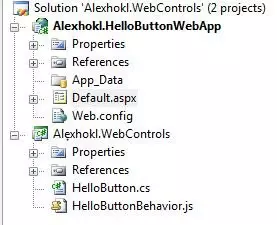
If you have set things above up correctly, you should now see “Hello” popping when you click on the button.
Start…
Add a folder to the WebControls project and name it “ScriptResources”. Inside
the folder, add a new item of type resource file and name it ScriptResource.resx.
If you finish you should have solution structure like this.
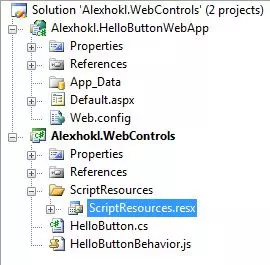
Open the resource file and add resource with name as “LabelHello” and value as
“Hello again!”. Once thing to notice is that if a resource file is added outside
App_GlobalResources folder (ScriptResources, this time), it will automatically
embedded into the assembly during compilation. You can verify this by checking
is “Build Action” property.
Next thing you have to do is to add ScriptReference attribute to the
HelloButton.cs like this.
The first argument of the attribute states which script file will use embedded
resources. The second states which resource it uses. Note that first part of the
string is the assembly name Alexhokl.WebControls. and the latter part
ScriptResources.ScriptResources is the relative path of the resource file
without extension resx. The third argument, as its name implies should be any
arbitrary but unique name. Honestly, for “best practice”, I’d name it as
Alexhokl.WebControls.Resources. But anyway, lets see how it works out in
javascript file. In HelloButtonBehavior.js, modified the _onClick function
to the following.
One last thing to do is to set attribute EnableScriptGlobalization of script
manager to true. Compile and run the web application. You should now see the
dialog box saying “Hello again!”.
Why?
Okay. It works. But what’s the magic? During compilation, the script manager
acknowledged from the ScriptResource attribute that
Alexhokl.WebControls.HelloButtonBehavior.js wants to use resource
Alexhokl.WebControls.ScriptResources.ScriptResources and make it available as
javascript object ArbitaryButUniqueName. Thus, the script manager just inject
the ArbitaryButUniqueName object to the bottom of the script. Open the script
file from browser using Firebug and you will see something like this at the bottom.
Bonus round
To test this implementation with internationalisation, we can add another
resource file to the ScriptResource folder. Let us name it
ScriptResource.de.resx and in the file add source with name as “LabelHello”
and value as “Guten Tag!”. That’s it! Compile and run the web application. Now,
when you click on the button, it should say “Guten Tag!” to you.
Again, how this is accomplished? You may feel more astonished when you look at
the size of assembly. If you compare with the previously compiled one, you will
find the size doesn’t change at all. The “magic” actually comes with an additional
assembly in “de” folder. You should now see the Alexhokl.WebControls.resources.dll
in the folder. This is the assembly responsible for script resources in German(de).
Thus, when you deploy your assembly, make sure you deploy this localised folders
as well; otherwise, the script manager will not be able to find the localised
resources.
Summary
I hope you will now be able to use resource files with embedded script and globalising your scripts efficiently. In this post, I just outlined the steps without very detailed explanation. If you want to know what happen behind the sense, you should read an excellent article Around the World with ASP.NET AJAX Applications from MSDN magazine.
Hope this helps… :)
